How I Build This Site (and Why It Isn't WordPress)
This site is built with Astro and hosted on Vercel. I change it by describing what I want to Claude, review a preview at its own address, and keep every past version. WordPress can't work this way.
Most personal sites I know of run on WordPress. It’s the obvious choice: there’s a theme for everything, and you can write posts in a browser. I went a different way. This site is built with Astro, hosted on Vercel, and most of the time I change it by talking to Claude Code.
This post is about how that works, and why I find it so much easier to live with than WordPress.
What the site actually is
The whole site is a folder of plain text files. Each blog post is one file, written in Markdown, with its title, date and tags at the top. The menu, the colors and the page layouts are a handful of other files in the same folder.
Astro reads that folder and turns it into a finished website: plain web pages that can be sent to anyone’s browser as they are. There’s no database and no admin panel. When someone opens a page, nothing has to run on a server to put it together. The page is already built.
Vercel does everything after that. It notices when the site changes, runs Astro to build it, and hosts the result. It serves the pages from a CDN, a network of servers spread around the world, so readers get them from somewhere nearby and pages load quickly. It also takes care of the secure HTTPS connection and the preview addresses I describe below. And it can do a lot more that I don’t need yet, such as visitor analytics, image optimization and small bits of server code.
Why that’s easier to maintain than WordPress
A WordPress site is a program that runs all the time: a server, a database, WordPress itself, a theme, and usually a stack of plugins. Each piece needs looking after.
Updates. WordPress, its themes and its plugins all release updates, many of them security fixes, and they need to be installed promptly. Sometimes an update breaks a plugin, and the plugin breaks the site. My site doesn’t need any of that. If I leave it alone for six months, it keeps working exactly as it did.
Security. A WordPress site has a login page and a database, so there’s always something to attack, and bots try the login page of every WordPress site on the internet. My site has no login and no database. There’s very little to break into.
Hosting. WordPress needs a host that runs its server and database, and it gets slow without extra caching plugins. Finished web pages can be served from anywhere. Vercel builds, hosts and serves them from its CDN with no setup on my part, and its free plan is plenty for a personal site.
Mistakes. In WordPress, a bad edit goes straight to the live site. Here, a change has to build successfully before it can go live. If I forget a post’s date, the build stops and the broken version never reaches anyone.
The cool part: describe it, preview it, keep everything
This is what really sold me.
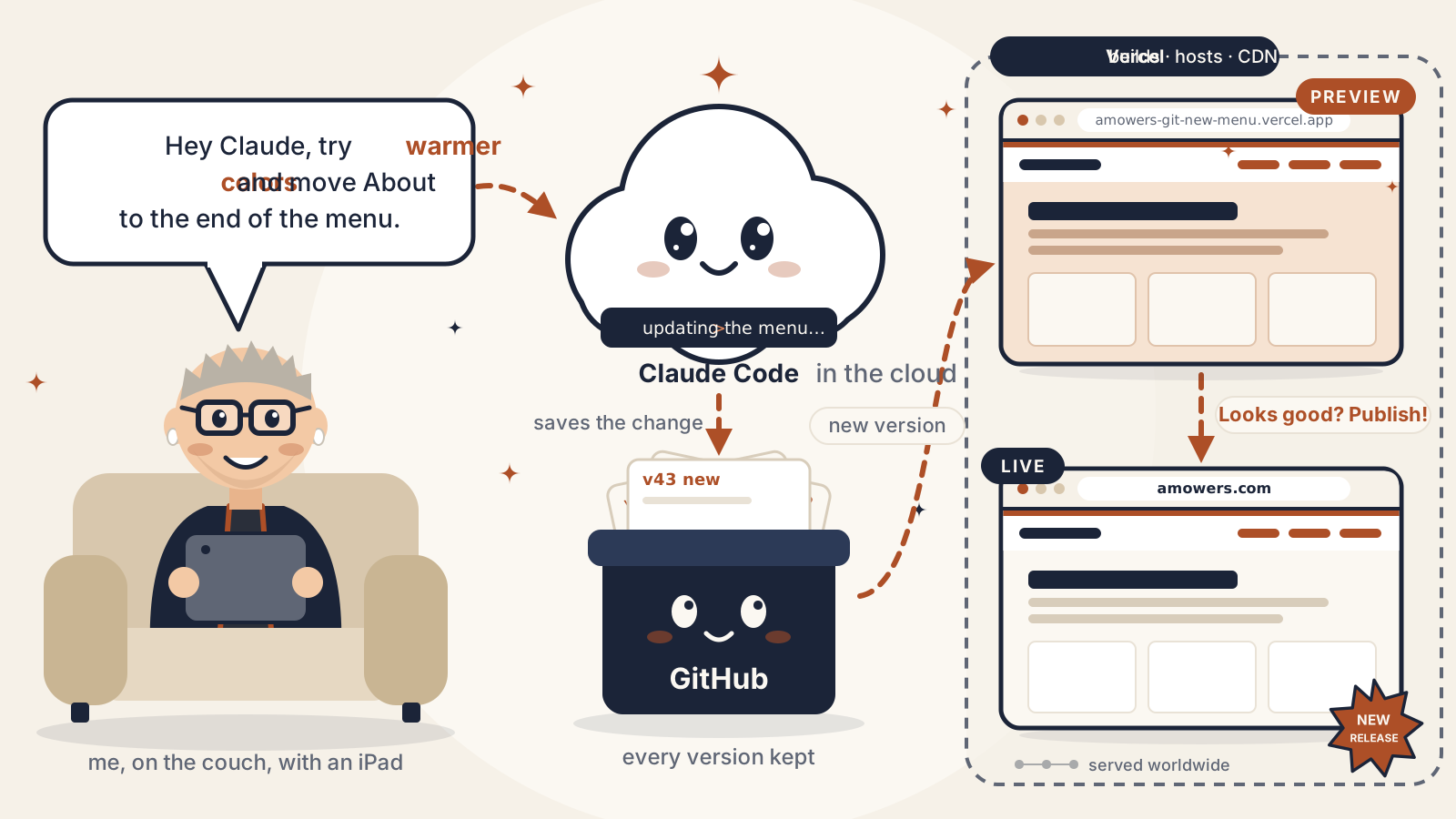
I can describe a change to Claude in plain words. “Move the About link to the end of the menu.” “Make the headings a little darker.” “Try a warmer background color.” Claude makes the change, and Vercel builds a preview of the whole site with that change in it.
That preview lives at its own web address, separate from amowers.com. I can open it on my phone or iPad, click around, and see the change on the real site with real posts. I can send the link to someone and ask what they think. Meanwhile amowers.com isn’t touched. Visitors keep seeing the current version until I decide the new one is ready.
If I like it, I publish it, and a minute later it’s live. If I don’t, I throw it away, or tell Claude what to change and get a new preview.
And every version of the site is kept. Every post, every color change, every tweak to the menu, all the way back to the first day. If I publish something and change my mind a week later, I can go back to exactly how the site looked before. Not just the text of one post, the whole site.
WordPress doesn’t work like this. It saves old drafts of individual posts, but not of your theme, your menus or your settings. Changing the design means changing the live site, and trying a change safely first means setting up a separate copy of the whole site, usually with another plugin or a more expensive host.
Updating the site from the couch
Since the site files are stored online and Vercel does the building and hosting, none of this has to happen on my laptop.
On my iPad I open the Claude app, start a Claude Code session, and set the environment to Cloud instead of This computer. The session then runs on Anthropic’s servers with its own copy of the site, so my laptop can be closed or switched off. I describe what I want, Claude makes the change, and Vercel builds the preview. I look at the preview on the iPad, and if it’s right, I publish it.
So I can sit on the couch in the evening, notice something I want to change, and have it fixed, checked and published before I get up. And that’s not limited to writing posts. I can change the menu, the colors or the layout the same way.
The short version
- The site is a folder of text files, and Astro turns them into finished web pages.
- Vercel builds the site, hosts it and serves it quickly from a CDN around the world.
- There’s no database to back up, no plugins to update and no server to patch.
- I describe changes to Claude, and every change gets its own preview address that I, or anyone I share it with, can review before it goes live.
- Every past version of the site is kept, so any change can be undone.
- With the Claude app on my iPad running Claude Code in the cloud, I can do all of this from the couch.
Most of the time, the only maintenance this site needs is writing for it.