Same Model, Different Harness
What happens between your prompt and the reply, and why the code around an LLM matters as much as the model itself.
Claude in the browser, Claude Code, Cowork, Claude in Excel, Claude in Chrome: a long list of products, all running on the same handful of models. So what makes them different?
Not the model. The harness: the code around the model that turns a stateless next-token predictor into an assistant. That was the subject of a talk I recently gave to my Advanced Software Engineering students at BFH. This post is the short version.
What leaves your computer when you type “hi”
Type Hi into a new chat and press send. What goes over the wire looks roughly like this:
{
  "model": "claude-…",
  "max_tokens": 1024,
  "system": [
    "You are Claude… [Anthropic base]",
    "[mode instructions…]",
    "Today is [date]. User: [name]…",
    "[your preferences, project, memory]"
  ],
  "tools": [
    { "name": "web_search", "input_schema": {…} }
  ],
  "messages": [
    { "role": "user", "content": "hi" }
  ]
}
Your “hi” is the smallest part. The app adds Anthropic’s system prompt, mode instructions, the date, your preferences and memory, and a description of every tool the model may ask for. Around 12,000 input tokens go in; a dozen come out.
Neither model nor max_tokens is seen by the model. model selects which trained model runs; treat it like a dependency version and pin it. max_tokens is a hard cap enforced by the serving code, and hitting it cuts the reply off mid-sentence. “Please be brief” belongs in the prompt; a hard limit belongs in the harness.
Every turn resends everything
The model remembers nothing between calls. Turn two sends the system prompt, tools, your “hi”, Claude’s reply and your new message. Turn three sends all of that again. “Thanks” only means something because the whole conversation comes with it.
Prompt caching keeps this affordable. If a request starts with exactly the same tokens as a recent one, the server reuses its work on that prefix. It isn’t cached answers and it isn’t memory; it’s memoisation for the first step of processing a prompt. As with a Dockerfile, put stable content first and changing content last, because any change invalidates everything after it.
Inside the model: how a word gains meaning
The tokenizer turns text into integer IDs and back. It is built before training by repeatedly merging the most frequent pair of neighbouring bytes, then frozen. The model never sees words, only IDs.
What happens next was, for me, the most interesting part of preparing the talk. The model uses each ID exactly once, to look up a vector: a list of thousands of learned numbers that places the token in a “meaning space”, where similar meanings point in similar directions. At that moment the vector for it means only “a pronoun”. It knows nothing about the sentence around it.
Then the vector passes through dozens of layers, and each layer enriches it with context. In every layer, each token turns its current vector into three new ones:
- a query: what I’m looking for
- a key: what I am
- a value: what I contribute
A token’s query is matched against the keys of every earlier token. The match scores become weights that add up to 100%, and the values are blended by those weights and added to the token’s vector. That is attention. A feed-forward step then adds knowledge stored in the model’s weights.
Take “The cat sat on the mat because it was tired”. Layer by layer, it goes from “a pronoun” to “the subject of was, pointing back to a noun” to “the cat, which is tired”. The layers never replace the vector; they keep adding to it. And the enriched vector isn’t a list of probabilities. It is still a point in meaning space, just a far more specific one. Probabilities appear only at the very end, when the last position’s vector is scored against the whole vocabulary to pick the next token.
The same mechanism predicts words. Given “The cat”, the vector for cat never turns into sat. But what The contributes, layer after layer, reshapes cat’s vector until it points towards sat.
The generation loop belongs to the serving code. It runs the whole prompt through in one parallel pass, picks a token, feeds it back in, and repeats until a stop condition. A query is used once, but keys and values are looked at by every later token, so the serving code keeps them: that is the KV cache. Prompt caching just keeps that cache between requests.
Three things follow for anyone writing prompts:
- Attention only looks back. Put the long document first and the question last.
- Everything in context competes. There is no “ignore this” switch.
- Stopping is a prediction. End-of-turn is just another token, which is why “answer in one sentence” works.
The harness
If the model only predicts tokens, the harness does everything else:
| Job | Examples |
|---|---|
| Keeps the state | Conversations, projects, preferences, memory |
| Builds each request | System prompt, tools and history |
| Runs the agent loop | Sends the request, reads stop_reason, sends the next |
| Executes tools | Shell, files, web search, MCP servers |
| Enforces rules | Permissions, approvals, max_tokens |
| Shows the result | Streams and renders the reply |
The model never runs anything. Ask about the weather in Bern and the reply contains a request, not an answer:
"content": [
  { "type": "tool_use", "id": "toolu_01…",
    "name": "get_weather", "input": { "location": "Bern" } }
],
"stop_reason": "tool_use"
The model has stopped. The harness checks permissions, runs get_weather, and sends a new request with the whole conversation plus the result:
{ "role": "user", "content": [
  { "type": "tool_result", "tool_use_id": "toolu_01…",
    "content": "Sunny, 18 °C" } ] }
Only now can the model write “It’s sunny in Bern”. Every tool round trip is a new request, and every result becomes input tokens. Stripped bare, the harness side of an agent is this:
messages = [user_task]
while True:
    response = call_model(system, tools, messages)
    messages.append(response)
    if response.stop_reason != "tool_use":
        break  # end_turn: the answer
    results = [run_tool(c) for c in response.tool_calls]
    messages.append(tool_results(results))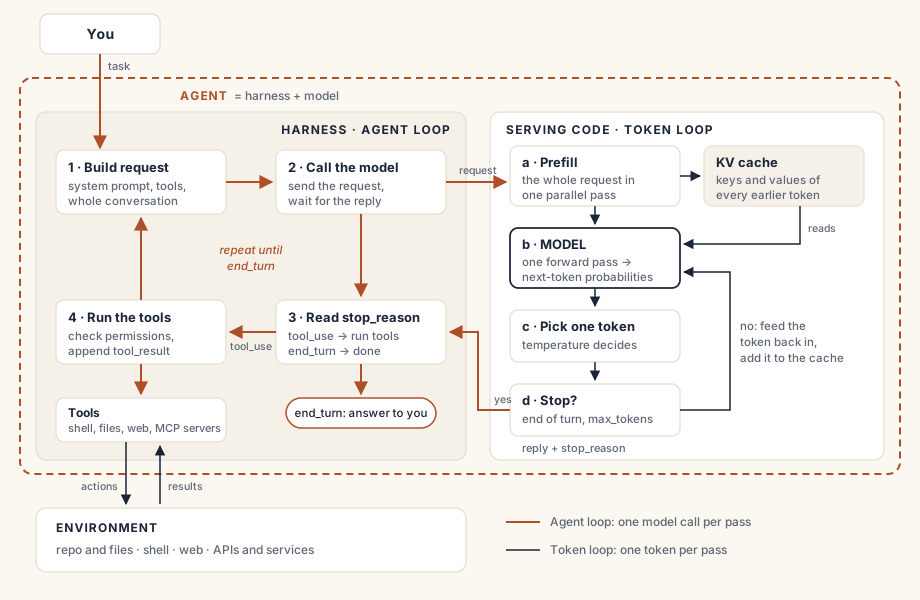
So there are two loops, one inside the other. Each call_model runs the serving code’s token loop until a stop condition. Around it, the harness’s agent loop reads stop_reason and decides whether to run a tool and call again or hand the answer to you. The model decides; the harness acts. Real products add permissions, limits, context management and hooks around that loop, which is why Claude Code, Cowork and Claude in Excel feel like different products. They are.
Agent, harness, model, environment
These four words get used loosely, so it helps to pin them down:
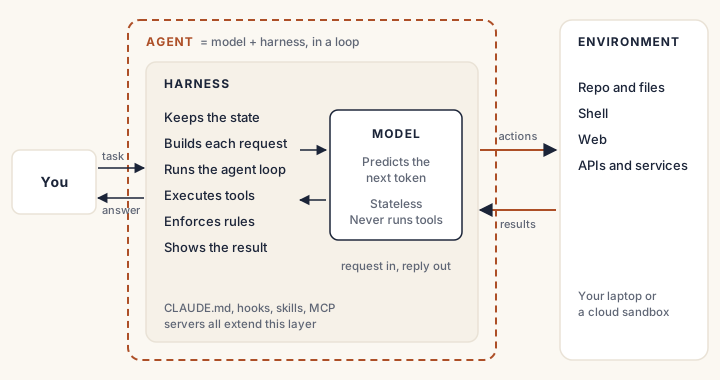
- Model: predicts the next token for the request it is given. Stateless, and it never runs anything.
- Harness: everything around the model. It keeps the state, builds each request, runs the loop, executes tools and enforces rules.
- Agent: the model and the harness together, looping until the task is done.
- Environment: what the agent acts on: your repository, the shell, the web, other services. Tools are the agent’s only way in.
The environment explains why Claude Code feels different on my laptop and in a cloud sandbox. Same model, same harness, but a different reach: on my laptop its tools touch my files, my git and my VPN; in the sandbox they touch only a clone and whatever the sandbox allows.
Harness engineering
If the harness shapes what the model sees and may do, we can engineer it. Using Claude Code and a small invoicing codebase, I covered five extension points.
CLAUDE.md: what the agent can’t guess
Asked to “add a 7% late fee”, an agent writes invoice.total * 0.07 and returns 420.70000000000005. This project keeps money as whole Rappen in a Money type, but nothing in the file says so. Correct it in chat and the fix expires with the session. Write it in CLAUDE.md and it is sent with every request, for every teammate:
- Money is whole Rappen, in the Money type. Never use float for amounts.It is context, though, not a rule: usually followed, never enforced.
Hooks: a request becomes a rule
“Never edit files in migrations/” can’t depend on usually. A hook is your script, run by the harness at a fixed point in the agent loop:
path=$(jq -r '.tool_input.file_path')
if [[ "$path" == *migrations/* ]]; then
  echo "Migrations are immutable: create a new one." >&2
  exit 2
fi
Exit code 2 blocks the edit and tells the model why. It adapts and writes a new migration. The model doesn’t get a vote.
Habit Hooks: coaching, not a rule ID
A bare linter warning invites the cheapest fix: a # noqa, or moving the nesting somewhere else. Habit Hooks pairs each finding with what a good developer would do next, such as “use guard clauses and return early”, delivered only when the smell appears.
Skills: practices on demand
“Improve the names” turns process_list(items) into get_filtered_unpaid_invoice_list(invoice_list): longer, not clearer. Tim Ottinger’s otter-skills packages his naming guide as a skill the agent loads when it renames things. The result: overdue_invoices(invoices). Only the skill’s description sits in every request; the full guide arrives when needed.
MCP servers: facts, not guesses
In invoicing.py, age_days > 30 looks harmless. But the same rule appears in four files the agent never opened, and grepping for 30 returns hundreds of hits. otter-kr, an MCP server, returns a bounded, cited answer: four locations, and which files change together in git. The skill judges; the MCP server supplies the facts.
The takeaway
The model is the same everywhere. The harness decides what it sees, what it can do, and what it must never do. Conventions go in CLAUDE.md, rules in hooks, practices in skills, facts in MCP servers.
Moving a trigger from the model into the harness turns a request into a rule. That’s harness engineering.